
Phishing
“ An email or web announcement that falsely claims to be from a legitimate source in an attempt to trick the user into surrendering private information or taking action. ”
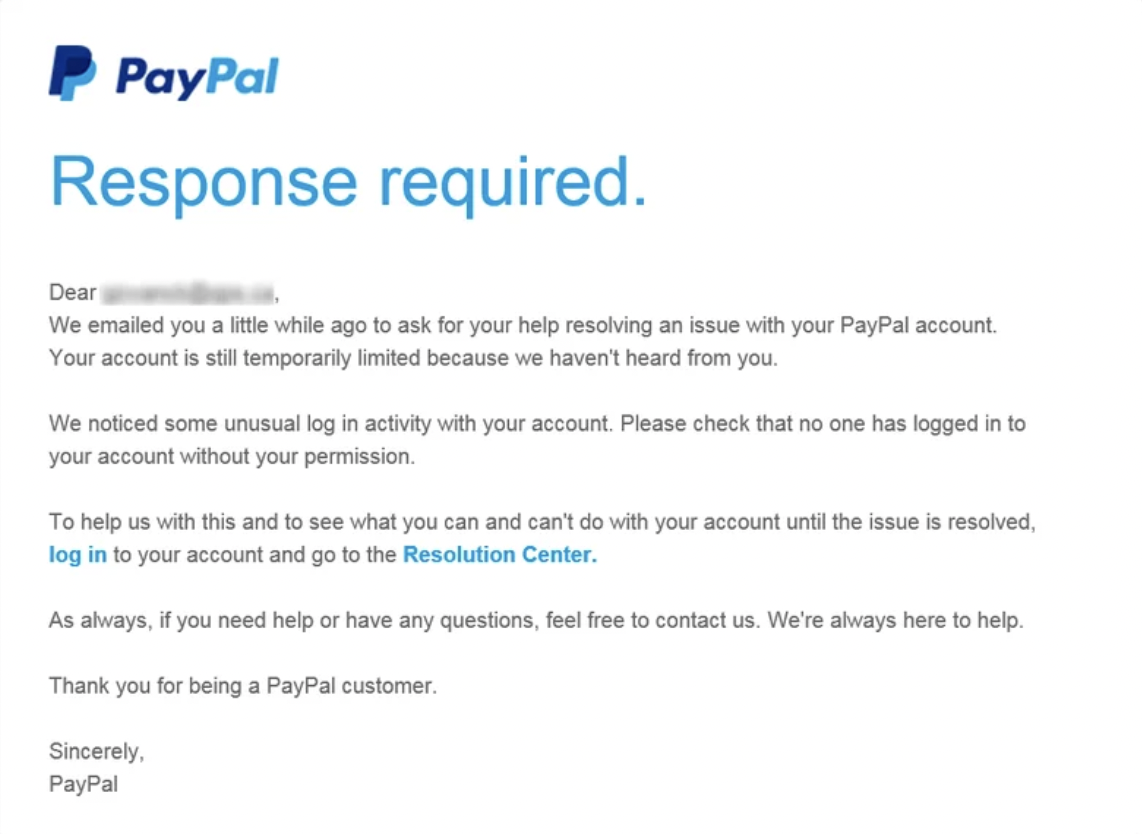

Consider this email designed to look like an official message from PayPal. Scammers use this tactic to trick recipients into clicking fake links - like the “log in” or “Resolution Center” links shown here - which actually lead to fraudulent websites that steal login credentials or personal information. Although it looks professional and urgent, real companies like PayPal never ask users to verify account activity or provide sensitive details through unsolicited emails. Always check the sender’s address, look for grammatical errors or suspicious links, and go directly to the website by typing the URL into your browser instead of clicking links in the email.
Phishing is one of the most common and effective forms of social engineering.¹ It works because instead of breaking through computer defenses, attackers trick people into opening the door for them. In a phishing attack, a cybercriminal sends a message (email, text, or direct message) that looks like it’s from a trusted source such as a bank, retailer, or service provider. The goal is to get you to click an unsafe link, open an infected attachment, or share sensitive information like passwords or credit card numbers.
Attackers use phishing for a variety of reasons. Some are after quick financial gain, stealing credit card data or login credentials to sell on the dark web. Others are part of larger operations that use phishing as a first step. Once an attacker gains access to a company account, they can move deeper into a network, spread malware, or steal confidential business data. On a smaller scale, phishing also fuels identity theft, account takeovers, and scams that target ordinary individuals for smaller but more frequent payoffs.
Phishing messages are carefully designed to trigger emotions like fear, urgency, or curiosity. They might claim your account will be suspended, promise an unexpected refund, or alert you to a “security problem.” These tactics make you act first and think later. The more realistic the message, with matching logos, language, or the tone of a legitimate organization, the more convincing the trap becomes.

Understanding Phishing
How to Protect Yourself
Fortunately, phishing relies on predictable tricks, and you can protect yourself by developing a habit of healthy skepticism. Always check the sender’s email address closely, even a small misspelling or added word (like paypal-security.com instead of paypal.com) is a giveaway. Avoid clicking links or downloading attachments in unsolicited messages; instead, go directly to the organization’s official website by typing the address into your browser.
Use multi-factor authentication whenever possible, it adds a strong layer of protection even if your password is stolen. Keep your devices and browsers updated so that known security flaws can’t be exploited. And finally, trust your instincts. If something feels off, it probably is. Reporting phishing attempts to your email provider or IT department not only helps you, but also helps stop attackers from reaching others.
Phishing is one of the oldest tricks in the cybercriminal playbook, but it remains powerful because it preys on human nature. By staying alert, verifying before clicking, and keeping good security habits, you turn what attackers count on: quick, emotional reactions, into your strongest defense.
¹ “Device and risk-avoidance behavior in the context of cybersecurity phishing attacks”, by Ilany-Tzur, N and Fink, L, October 2025