Securing Your Computer
🔒 Keep your operating system and software up to date
🔒 Use a strong, unique password/passphrase for every account
🔒 Turn on and configure your system firewall
🔒 Backup your data regularly
🔒 Uninstall unused applications
🔒 Install reputable antivirus and anti-malware tools


Computer security isn’t just for businesses and IT professionals, it’s something everyone should take seriously. Your personal computer holds sensitive information like passwords, financial data, photos, and private messages. If it’s not properly protected, that information can fall into the wrong hands. There are many practical steps you can take to make your computer a difficult target, and if you’ve read a few other pages on this site, some should be familiar.
One of the most important steps is keeping your system and software up to date. Hackers often exploit known vulnerabilities in outdated programs and operating systems. When updates get released, they usually include security patches that fix these weaknesses.¹ Turning on automatic updates for your operating system, browser, and antivirus software ensures you receive the latest protections without having to remember to check manually.
Installing and maintaining reliable antivirus or anti-malware software is another crucial layer of defense. These programs constantly scan for unusual activity, suspicious programs, and potential intrusions. Some tools are built to send an alert when anything suspicious comes up, and others can even act on the potential threat to try and shut it down. There’s debate on which software is better and it does depend on circumstance, but a common complaint of active anti-malware is the issue of false positives. When it flags something genuine by mistake, the program may end up interfering with a legitimate operation which can become a headache for the admin if it happens a lot. Even if you use a Mac or Linux system, antivirus protection is still recommended. No system is completely immune from malware or phishing attempts.
Your passwords also play a major role in your computer’s security. Weak or reused passwords are one of the easiest ways for attackers to break into your accounts. A strong password paired with MFA closes an important entry point for many attacks. You can make passwords even easier by using a password manager, which securely stores your passwords and can automatically generate new, strong ones if needed.
Be cautious about what you click on or download. Many cyberattacks begin with phishing emails or fake websites designed to trick you into revealing personal information or installing malware. Always verify who messages are really from, think about links before clicking them, and avoid downloading attachments from unknown sources. If something looks suspicious or “too good to be true,” it probably is. Keep in mind that if an attacker manages to trick you into letting them in, the device involved is the one that can be immediately vulnerable. If the intruder is competent and has enough time in your system, there’s always the possibility that they escalate access using what they have discovered. If they find a list of passwords on the computer, for example, they could use it to expand their reach into your accounts, opening a range of harmful possibilities.
It’s also smart to secure your internet connection. When using public Wi-Fi, avoid accessing sensitive accounts or sending personal data unless you’re connected through a VPN. A VPN encrypts your internet traffic, making it far more difficult for hackers to intercept your data while you’re online. You can enable full-disk encryption, too, which scrambles your files so they can’t be read without your password or encryption key, even if someone steals your physical device. Make sure to lock your screen whenever you step away from your computer, especially in public places.
Another powerful line of defense is your computer’s firewall. A firewall acts like a guard that monitors all incoming and outgoing network traffic. It decides which connections are safe to allow and which ones to block, helping to prevent unauthorized access to your system. Most modern operating systems, such as Windows and macOS, include a built-in firewall that should always remain enabled. You can configure your firewall by setting rules to block specific programs from accessing
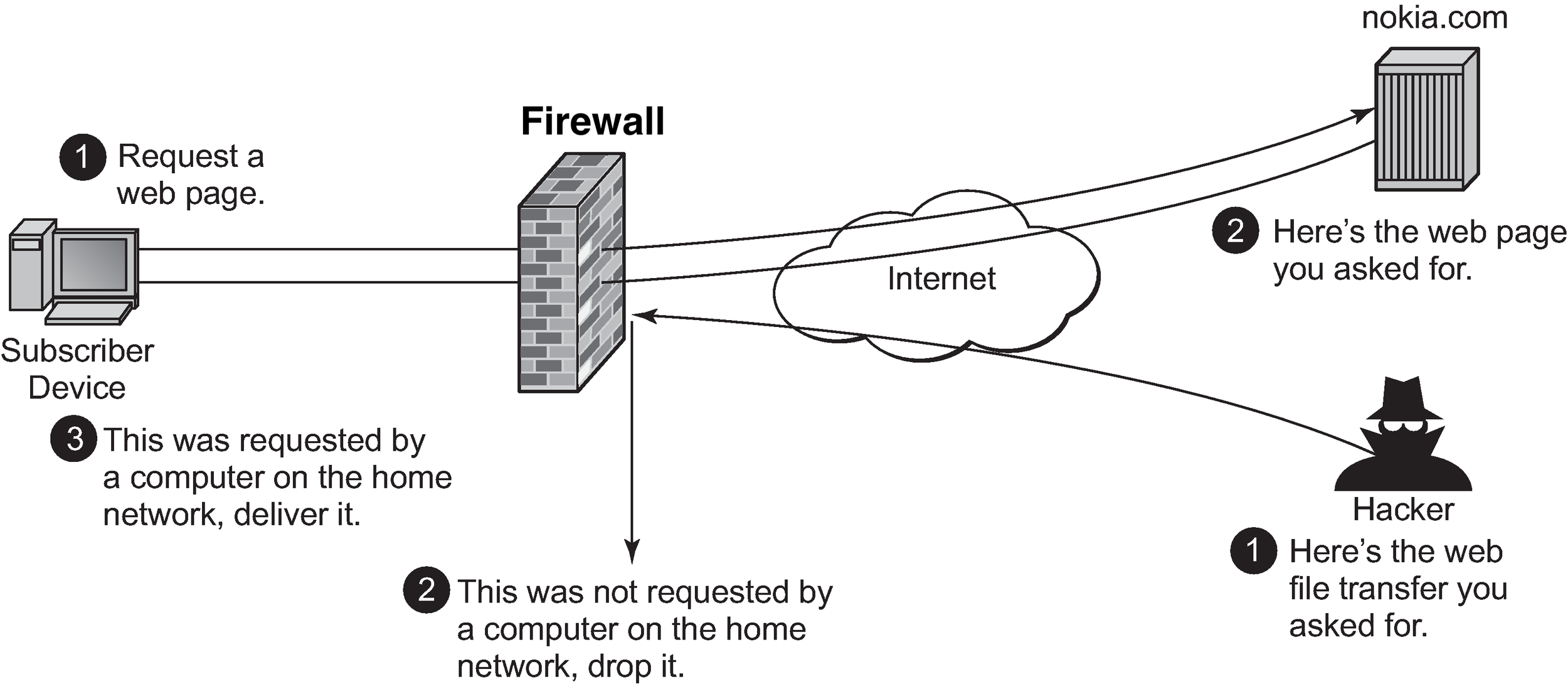
the internet or to alert you when something suspicious tries to connect. Keeping your firewall active ensures that even if a hacker tries to probe your system, the attempt is stopped before they reach your data.
Regular backups are another key habit that many people overlook. If your system is ever compromised by malware, ransomware, or hardware failure, a recent backup can be the difference between a quick recovery and losing everything. You can back up your files to an external hard drive or a trusted cloud storage service, ideally both. Set a schedule so backups happen automatically.
By combining these steps - keeping software updated, using strong passwords and MFA, being cautious online, and backing up your data - you’ll be well on your way to maintaining a secure computer. Good security is about balancing convenience and protection. That means that it’s not in everyone’s best interests to invest in every single defense out there. Take a few minutes to think about which threats are most likely to affect you and put some protections in place. Some things are free and you should always take advantage of them, like good passwords, MFA, and built-in device firewalls. But other tools like anti-malware, storage for backups, more advanced firewalls, and VPNs come at a cost. It’s up to you to decide which products are worth spending on to protect your computer. Awareness is one of the best defenses you can have.
¹ “Exposure of software vulnerabilities on Twitter: Analyzing vendors’ behavior of releasing software patches”, Syed, R, Kaur, J, and Silva, L, April 2025